
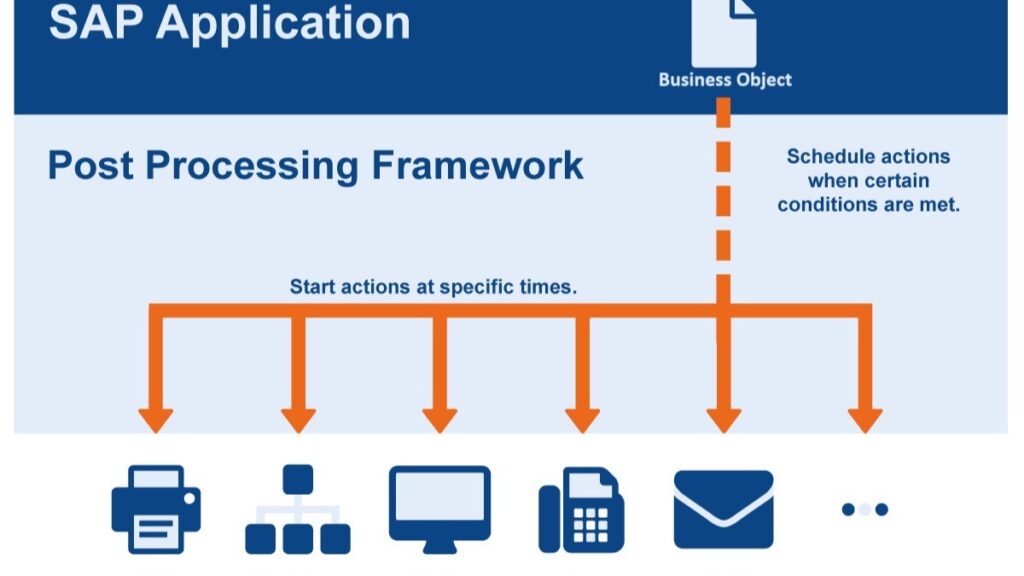
When it comes to automating outputs and actions in warehouse operations, SAP Extended Warehouse Management (EWM) leans on a robust engine called the Post Processing Framework (PPF). Whether you’re printing a delivery note, sending system messages, or kicking off custom logic—PPF is the silent orchestrator that ensures these follow-up actions happen smoothly and on time.
Let’s break it down for newbies and seasoned consultants alike.
🔍 What Is PPF, Really?
PPF is a cross-application framework built into the SAP Web Application Server. It replaced the older Message Control mechanism with greater flexibility and extended functionality. PPF helps determine and execute follow-up actions in response to document-level conditions—either instantly or at a later time.
For SAP EWM, it’s a game-changer in controlling outputs for key business processes like deliveries, warehouse orders, handling units, and physical inventory.
🧩 Core Building Blocks of PPF
Here’s the simplified anatomy of PPF:
1. Action Profile
- Groups multiple action definitions under one umbrella.
- Determines how and when actions are executed.
- In SAP EWM, profiles can be hard-coded or configured via customizing.
- Includes common profiles provided by SAP, which offer reusable actions across processes.
2. Action Definition
- Describes what the action does—print, email, update logic, etc.
- Scheduled when a condition is met; processed immediately or deferred.
- Configured to work with specific output types (e.g., Smart Forms).
- Contains valid processing times, such as “Immediate” or “On Save”.
3. Processing Time
PPF allows flexibility in timing execution:
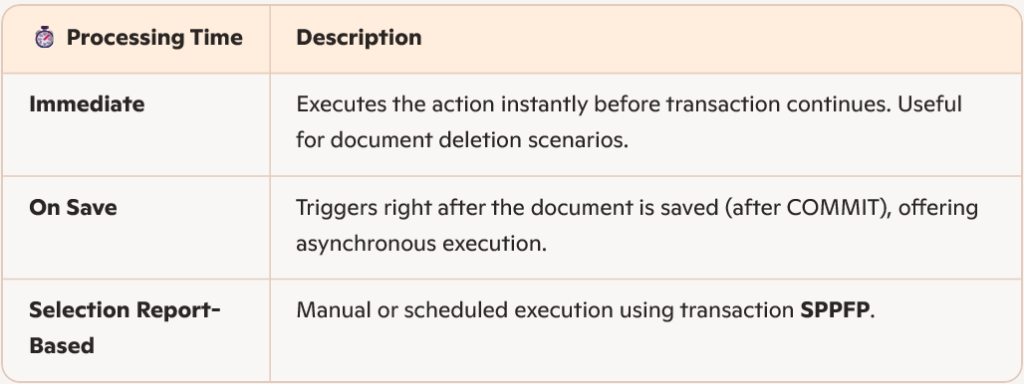
⚠️ Caution: Immediate processing can cause issues like printing without a saved document if the action runs before validation fails.
🎯 Action Scheduling: Behind the Scenes
Action determination (aka scheduling) checks if the conditions to trigger an action are met. This is controlled via the Business Add-In (BAdI) EVAL_SCHEDCOND_PPF. SAP EWM contains custom logic for this evaluation, depending on the application area.
🧪 Monitoring & Troubleshooting PPF Actions
SAP provides tools to monitor and troubleshoot your PPF actions:
SPPFP – Process Actions
- Used to trigger and review actions manually.
- Select based on application type, action profile, or document key.
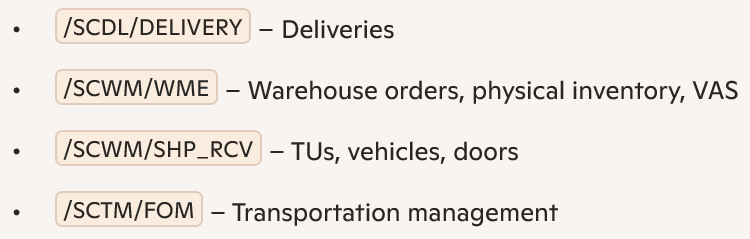
- Typical EWM application keys include:
Failure Handling
- Use the Incorrectly Processed (2) status and select Non-Repeated Actions to isolate failures.
- Retrying actions creates a new copy—the original failed record remains for audit.
Application Logs
- Use transaction SLG1 with object PPF and subobject PROCESSING to view deeper execution history.
🗃️ Archiving Obsolete PPF Actions
Before archiving business documents, clean up redundant PPF actions using report RSPPFCLEAN. This ensures your system stays lean and performant.
⚡ Final Tips for Practitioners
- Avoid scheduling multiple actions that simultaneously change delivery data using the same processing time—this leads to locking conflicts. Reference SAP Note 1599301 for serialization options.
- For business-side monitoring, explore transactions like /SCWM/MON for real-time object tracking.
🔜 What’s Next? PPF in EWM Delivery Processing 🚚
Now that we’ve explored the foundation of PPF, it’s time to shift gears toward real-world execution.
In the next blog, we’ll dive into how PPF is used in SAP EWM delivery processing—unpacking action profiles like /SCDL/DELIVERY, exploring smart form printing for delivery notes, and walking through the scheduling conditions that drive outbound/inbound automation.
Whether you’re configuring your first delivery-related action or fine-tuning performance in a live warehouse, this next entry will help you unlock efficiency and precision using the power of PPF.
👉 Stay tuned—it’s coming soon.