
Once waves are created, timing becomes the maestro of efficiency. In SAP EWM, it’s not just about what gets grouped—it’s about when, how much, and which path each wave takes. Welcome to the strategic side of wave management.
What You’ll Learn:
- The difference between manual and automatic wave creation
- How wave templates define release timing, exception handling, and item rules
- How temporal dependencies guide warehouse scheduling
- Using capacity profiles to control wave size and prevent bottlenecks
- How SAP EWM determines the right wave template using delivery attributes
- Right Tools for keeping a track
🌊 Mastering Wave Management in SAP EWM: Core Questions Answered
Efficient wave management is the heartbeat of streamlined warehouse operations. In SAP Extended Warehouse Management (EWM), building and controlling waves isn’t just about logistics—it’s about precision, timing, and adaptability.
Let’s dig into four essential questions that guide successful wave strategy:
❶ 🛠️ How Are Waves Built in SAP EWM?
SAP EWM offers manual and automatic wave creation—giving you full control or hands-off automation depending on your needs.
- Manual Creation: Via apps like “Maintain Wave” or the Warehouse Management Monitor, users handpick items and assign them to a new or existing wave. It’s perfect for ad-hoc bundling based on current warehouse conditions.
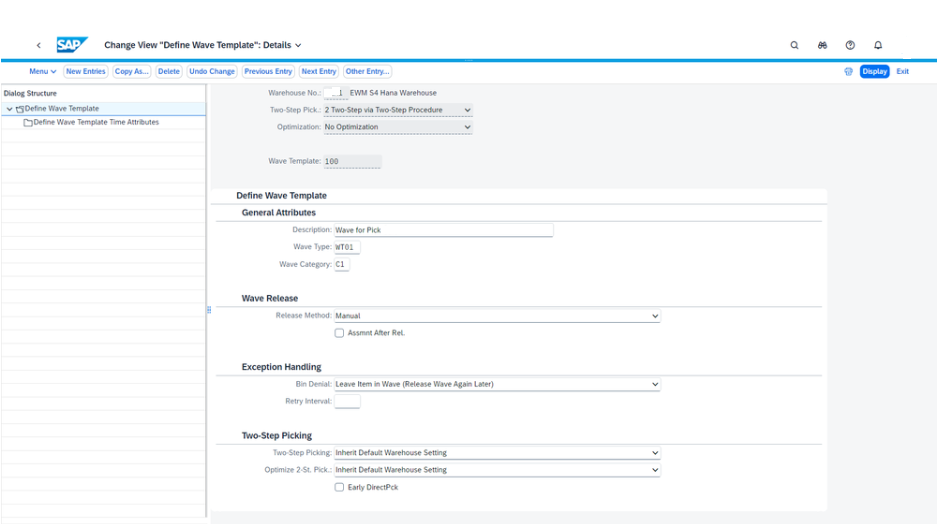
- Automatic Creation with Wave Templates: Wave templates serve as blueprints that define how waves are built. Key parameters for Wave templates are described below in detail:
1. 🕹️ Release Method: Timing Your Wave Like a Pro
The Release Method in SAP EWM controls when a wave enters execution mode—and timing can make or break warehouse flow.
- Immediate Release The wave is released instantly upon creation—ideal for urgent orders or lean operations where action needs to happen fast.
- Automatic Release EWM holds the wave and releases it at a predefined point in time. This approach is perfect for time-sensitive logistics, coordinating with staging deadlines, truck departures, or production line schedules.
- Manual Release A warehouse operator triggers the wave manually, offering ultimate control for scenarios that require oversight or flexibility.
This parameter empowers teams to align wave execution with operational realities—whether that’s precision-timed fulfillment or agile, just-in-time responsiveness.
2. 🔍 Wave Type & Wave Category
Understanding wave types and wave categories is key to mastering how SAP EWM manages warehouse execution at scale.
- Wave Type: Think of this as a classification tool for monitoring. All waves assigned a specific type—like “Small Parts Pick Waves”—can be grouped and tracked together. This simplifies visibility in the Warehouse Monitor and lets you manage similar operations in bulk.
- Wave Category: This influences how picking orders are generated. It acts as a filter in the warehouse order creation rules, tailoring logic based on the nature of the wave. For example, small parts often require piece picking and multi-order strategies, while full-pallet waves follow different sequencing and task grouping.
In short, wave type helps you group and track, while wave category helps you control how picking is performed—both are vital in customizing your warehouse flow
3. 🕓 Wave Open Duration: Flexibility Meets Fulfillment
In SAP EWM, the parameter controlling how long a wave remains open for item assignment plays a crucial role in last-minute order handling and overall warehouse responsiveness.
Even after a wave has been released, SAP EWM allows the addition of further items—making it possible to accommodate late-arriving orders without disrupting the fulfillment timeline. This capability is particularly valuable when orders are received close to the planned goods issue time. Instead of creating a new wave or missing delivery windows, EWM lets you ride the current wave—optimizing resources and maintaining timely dispatch.
It’s a smart example of real-time adaptability: extend wave activity without sacrificing precision, ensuring that last-minute items still make it out the door, on schedule.
4. 🚧 Exception Handling in Picking: Keeping Waves on Track
Even the most meticulously planned wave can face hiccups during picking—especially when physical stock doesn’t match expectations due to inventory differences. SAP EWM offers several smart ways to deal with such exceptions, giving warehouse managers the flexibility to adapt without derailing operations.
Here’s how exceptions can be handled:
- ⏳ Keep Items in the Wave If missing stock is expected to be replenished soon, you can allow items to remain in the wave and release it again later, either manually or via scheduled automation.
- 🔄 Reassign to Another Wave If alternative stock is available in another storage bin, SAP EWM lets you remove the item from the original wave and add it to another wave—either existing or newly created.
- 🚨 Create an Exceptional Wave For items that require special handling or urgent resolution, assign them to a dedicated wave designed specifically for exception scenarios.
- 📦 Generate a New Warehouse Task Alternatively, bypass wave reassignment and directly create a new warehouse task that pulls stock from a different bin. This is ideal when speed trumps planning.
These mechanisms allow waves to be both robust and flexible—responding to inventory discrepancies without compromising fulfillment goals.
5. ⏱️ Automating Wave Release: Timing, Repeats & Template Options in SAP EWM
One of the most powerful features in SAP EWM’s wave management toolkit is the ability to schedule automatic wave releases—keeping operations timely and friction-free.
With wave templates, you can define:
- Exact release times, based on delivery schedules or operational cutoffs
- Repeat intervals, allowing EWM to retry wave release if exceptions (like stock shortages) occur during the initial attempt
This repeat logic helps ensure that waves are released as planned—even if the first attempt hits a snag. And it keeps the picking, packing, and staging timelines aligned with business needs.
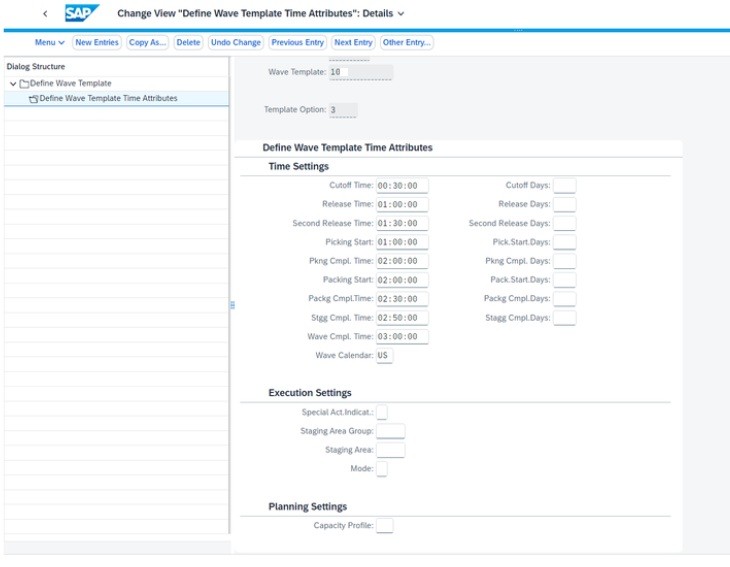
But that’s not all. SAP EWM leverages Wave Template Options to control the temporal dependencies of a wave—from release to completion. These options define the key timestamps and lead times, such as:
- Wave Completion Time
- Wave Release Time
- Picking, Packing, and Staging Completion
- Cut-Off Time
By configuring these precisely, warehouses can manage multiple waves across the day, adjust for holidays via the factory calendar, and create time slices for a smoother workload distribution.
Wave templates bring consistency while still allowing flexibility—especially when last-minute orders are added without disrupting fulfillment timelines.
❷ ⏰ How Are Time Dependencies Mapped?
Timing is everything—and wave template options bring intelligent scheduling to life.
- Wave Completion Time is your anchor point: It’s the deadline by which picking, packing, staging, and goods issue must finish. EWM calculates backward from this point to schedule each phase. This date and time is always calculated first during wave template determination.
Real-World Example: If a shipment must leave by Monday 5 PM, and the wave template defines completion at 3 PM, EWM selects or creates a wave that satisfies this. If the planned goods issue is Monday 2 PM, that same wave wouldn’t work—EWM would instead use a Friday wave(considering Saturday and Sunday are holidays.. more on that later), ensuring the timeline stays intact.
SAP EWM doesn’t just ensure orders are shipped—it ensures they’re shipped right on time. With wave template options, the system intelligently schedules outbound delivery items across the day to achieve two crucial goals:
- ✅ Timely Completion: Waves are released and executed precisely so that goods reach the customer on schedule.
- 🚫 Avoid Premature Processing: Items aren’t scheduled too early, preventing workflow congestion or the blocking of more urgent activities.
This approach balances urgency and efficiency. Instead of front-loading the day with early processing that clogs staging areas or ties up resources, EWM allows each wave to flow according to real delivery needs. The result? A just-in-time execution model that maximizes warehouse capacity and prioritizes what truly matters—customer satisfaction through on-time delivery.
📆 Time-Orchestrated Waves: From Completion to Execution
In SAP EWM, Wave Completion Time isn’t just a finish line—it’s the starting point for calculating every timestamp that keeps warehouse execution in perfect sync.
Once the Wave Completion Time is set, SAP EWM automatically derives key process deadlines for each wave:
- 🔁 Staging Completion Time When staging activities must be finalized to ensure outbound alignment.
- 📦 Picking Completion Time This feeds directly into calculating the Latest Start Date for picking tasks, based on estimated picking duration.
- 🎁 Packing Completion Time Ensures packed goods are ready ahead of staging or truck loading.
From these, SAP EWM also derives:
- ⏱️ Wave Release Time When the wave is triggered for execution. For example, if a wave ends at 4:00 PM on Tuesday and the release offset is “1 day prior at 8:00 PM,” the wave would release on Monday at 8:00 PM.
- 🚫 Cutoff Time The last moment when new items can be added to the wave before execution kicks off. System does not allows new items to be added to wave after the Cutoff time is reached. It is also not possible to determine templates which do not have a cutoff time.
All these timestamps are calculated using lead times and date logic defined in the Wave Template Options, taking into account working days, weekends, and public holidays via the factory calendar. To enhance granularity, multiple wave template options can be assigned to a single wave template, each with different start and end times. This allows warehouses to divide the day into micro-waves or time slices—perfect for balancing workloads, avoiding bottlenecks, and ensuring even throughput across shifts.
❸ 📦 How Can We Control Wave Size and Scope?
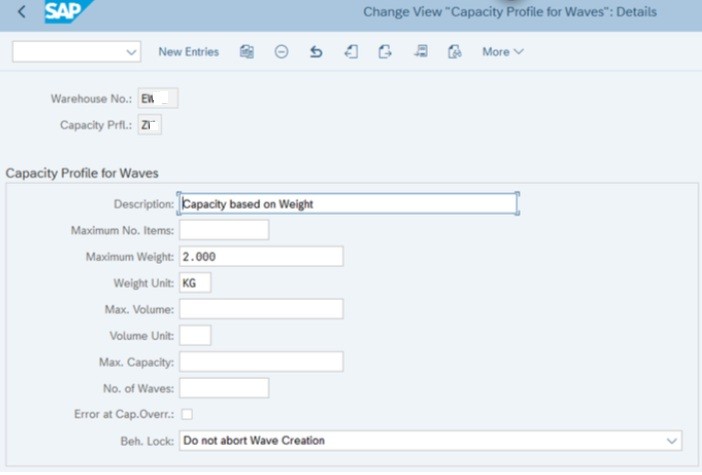
The secret lies in Capacity Profiles within the wave template option.
These allow you to define:
- 🔢 Maximum number of items per wave
- ⚖️ Weight limits
- 📐 Volume constraints
By setting these boundaries, SAP EWM ensures resource balance and avoids overcrowding picking areas—especially vital during high-demand windows.
❹ 🧬 How Is the Right Wave Template Determined?
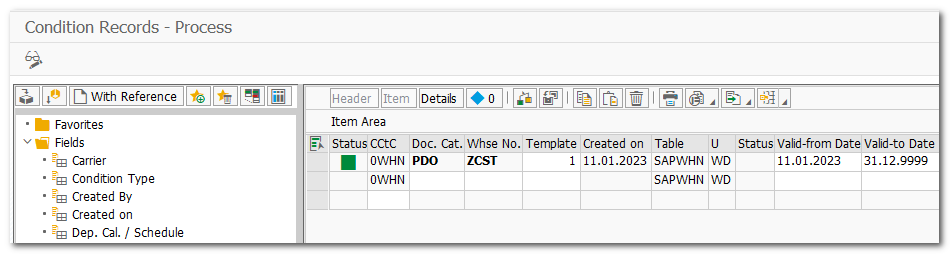
For automatic wave creation, SAP EWM uses the Condition Technique:
- 🔍 Based on delivery or warehouse request attributes, the system searches condition records to find the most fitting wave template.
- ⚙️ Automatic wave creation is triggered as a follow up action via the Post Processing Framework (PPF) for the warehouse request—EWM builds or adds to existing waves following the logic embedded in those templates.
After wave release, EWM generates optimized picking orders. You can even group items across waves for multi-order picking, enhancing throughput further and generating optimal pick trips. This can be achieved by selection multiple waves and releasing them together via Monitor “Wave Release” method.
🧪 Wave Simulation in SAP EWM: Predict Before You Pick
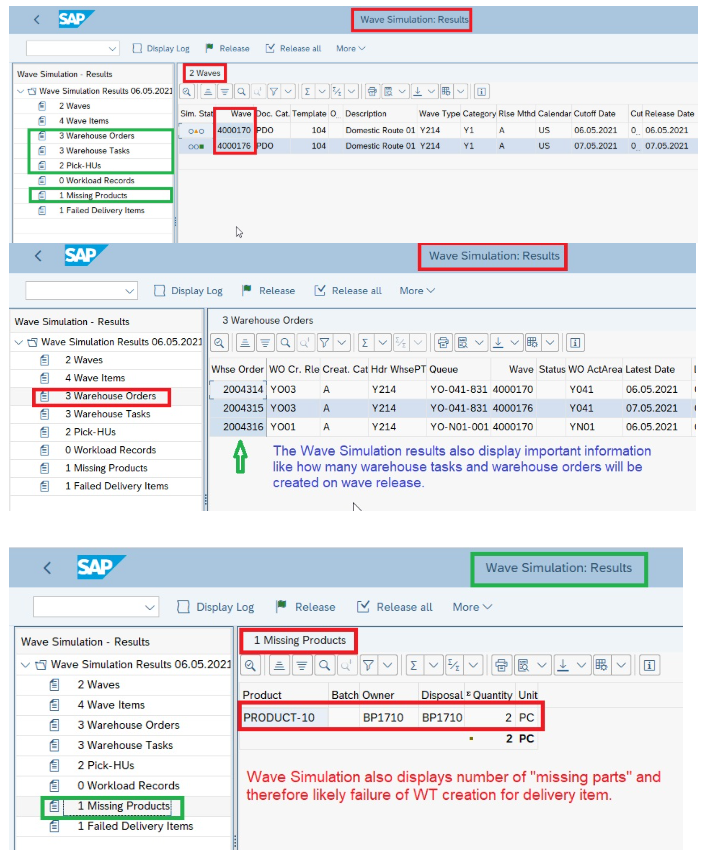
Before pulling the trigger on a wave release, SAP EWM offers warehouse supervisors a powerful tool: wave simulation. It’s like having a crystal ball for your operations.
Simulation runs SAP EWM’s stock removal strategies and picking order logic in real time—without creating any actual warehouse orders. It mirrors the wave release process 1:1, generating detailed insights while keeping the system unchanged.
So why is this a game-changer?
- 🔍 Early Detection of Stock Issues Supervisors can spot gaps in physical inventory or bin availability before execution begins.
- 📊 Workload Forecasting EWM shows how much workload will be generated by the wave across various zones—helping you prepare labor and resources accordingly.
- 🚧 Bottleneck Prevention With real-time simulation data, teams can address imbalances and adjust wave contents proactively, leading to smoother execution.
- 🎯 Boost On-Time Delivery Rates The ability to plan and adapt before actual release means fewer surprises—and far better fulfillment performance.
Wave simulation empowers managers to plan intelligently, respond early, and execute with confidence—making it a cornerstone of precision logistics in SAP EWM.
🖥️ Your Command Center: The Warehouse Management Monitor
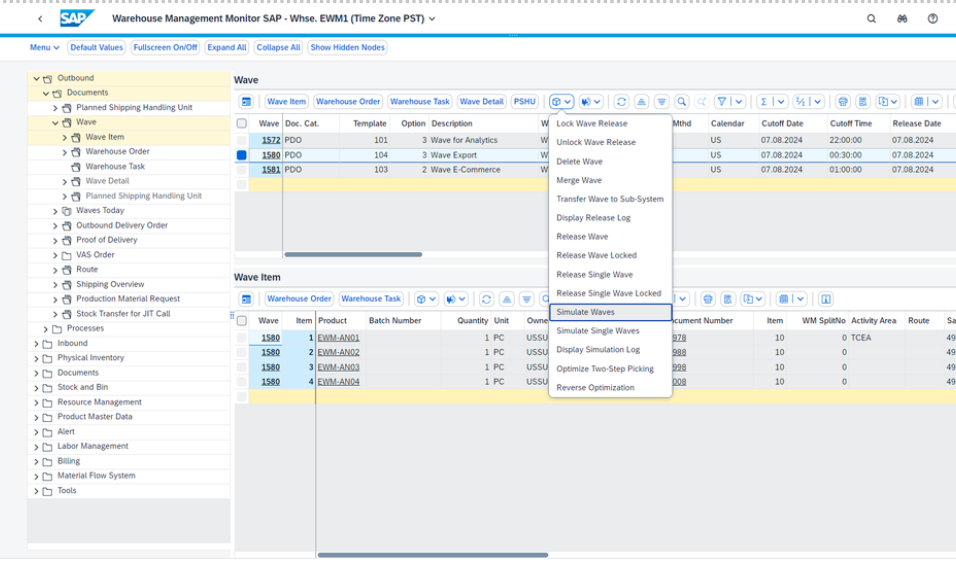
In the realm of wave management, no tool is more central—or more versatile—than the Warehouse Management Monitor in SAP EWM. It’s the cockpit from which warehouse supervisors orchestrate, troubleshoot, and fine-tune every wave-related activity.
Here’s what makes it indispensable:
- 🔐 Lock & Unlock Waves for Release Control when a wave goes live or hold it back for further refinement.
- 🔄 Combine, Split, Reassign, or Delete Waves Merge waves for efficiency, split overloaded ones, or reassign items where needed—all from a single interface.
- ➕ Manual Wave Creation Easily create new waves directly within the monitor, choosing the exact items to bundle based on operational needs.
- 🧪 Simulate Wave Release Preview execution before committing. Run stock removal strategies and order creation logic in a simulation mode to detect bottlenecks, assess workload impact, and resolve stock issues early.
This monitor doesn’t just display—it empowers action. Whether you’re running ad-hoc adjustments or managing complex wave templatea cross shifts, the Warehouse Management Monitor is the tactical hub of real-time operational control.
⏳ Precision Achieved—What Comes Next in Smart Wave Planning
This second part highlights how SAP EWM’s configuration tools help warehouse managers fine-tune operations with surgical accuracy. But what if your system could learn and improve these decisions over time?
🔗 Stay tuned for Part 3: AI-Enhanced Wave Logic—where automation meets intelligence to redefine how waves are built, sized, and scheduled.